

OVHcloud
Connect OVHcloud as an access review source using OAuth or a service account so Probo can list the identities that can reach your OVHcloud account.
Probo reads the identities that can reach your OVHcloud account through the OVHcloud API so you can review who has access. Connecting with OAuth is the recommended method and requires no credential management. A service account is also available, and it is the one to choose if you want to revoke Probo’s access yourself.
Prerequisites
Section titled “Prerequisites”- Probo organization administrator access
- For OAuth, an OVHcloud identity whose permissions cover the account. The account holder always qualifies
- For a service account, permission to create one and to attach an IAM policy, under Identity, Security & Operations
- An OVHcloud account in the Europe region. OVHcloud issues OAuth2 clients per region, so accounts on the Canada and US regions cannot connect yet
Collected Fields
Section titled “Collected Fields”| Probo field | OVHcloud field | Notes |
|---|---|---|
| Name | firstname + name, oauth2.client.name, api.application.name | The account holder’s first and last name joined into one display name, a service account’s own name, and for a classic API credential the name of the application it belongs to. Local users and federated users carry no name in OVHcloud |
email | Local users and the account holder. A federated user carries the subject the SSO provider asserted, when that subject is an email address. A service account has none | |
| Role | groups, group, api.credential.rules | The user groups the identity belongs to, which is what you grant and revoke. The account holder is reported as Account owner. A classic API credential lists the access rules it was granted, preceded by Created by OVHcloud support when OVHcloud created it. Service accounts and federated users have none |
| Admin | group role | For a local user, flagged when any of its groups carries the ADMIN role, and left blank when a group cannot be resolved. The account holder is always flagged. Left blank for service accounts and federated users, whose privilege OVHcloud does not expose |
| Status | status | For a local user, DISABLED is inactive and PASSWORD_CHANGE_REQUIRED stays active, because the user authenticates once the password is rotated. A classic API credential is active only while validated; an expired or refused one stays in the roster as inactive. The account holder and service accounts are always reported active. A federated user has no status, because OVHcloud does not manage the identity |
| MFA | loginSuccessDetails.mfaType | Read from the account audit log. It reports the factor a sign-in actually used, not what the identity has enrolled |
| Last login | createdAt of a LOGIN_SUCCESS event, lastUse | The most recent successful sign-in in the audit log. For a classic API credential it is the last time the credential called the API, which is empty if it never has |
| External ID | urn, identity, nichandle, credentialId | The identity’s IAM URN, falling back to the login when OVHcloud returns none. The account holder is tracked by NIC handle, a service account by its IAM credential URN or its client ID, a classic API credential by its credential ID, and a federated user by the subject the audit log recorded |
| Created at | creation | When the local user or the classic API credential was created. Probo does not record a creation date for the other identity types |
Probo reports five kinds of identity because no single OVHcloud endpoint lists them all. Local users come from the identity API. The account holder is a separate identity class that the user list never returns, so Probo reads the account itself. Service accounts are the client-credentials clients registered on the account. Classic API credentials are the consumer keys issued under API keys, which predate IAM and appear in no identity endpoint. Federated users come from the audit log.
Classic API credentials are worth reviewing even when nobody remembers creating one. Each is standing API access that does not expire unless it was given an expiry, and OVHcloud records whether the credential was created by you or by its own support team. Probo labels a support-created credential in its Role column so it is visible in the review rather than buried.
Federated users are covered only in part. OVHcloud does not manage identities that sign in through your SSO provider, and maps them to groups rather than to users, so there is no endpoint that lists them. Probo reports a federated user once the audit log records a successful sign-in, and reports nothing about them beyond that sign-in. A federated user who has not signed in within your audit log’s retention window does not appear at all. Review them in your identity provider.
OVHcloud also has no read-only OAuth scope, and exposes no per-user MFA enrolment state. The MFA column reports what the recorded sign-ins show.
Connect OVHcloud
Section titled “Connect OVHcloud”Option A: Connect with OVHcloud (recommended)
Section titled “Option A: Connect with OVHcloud (recommended)”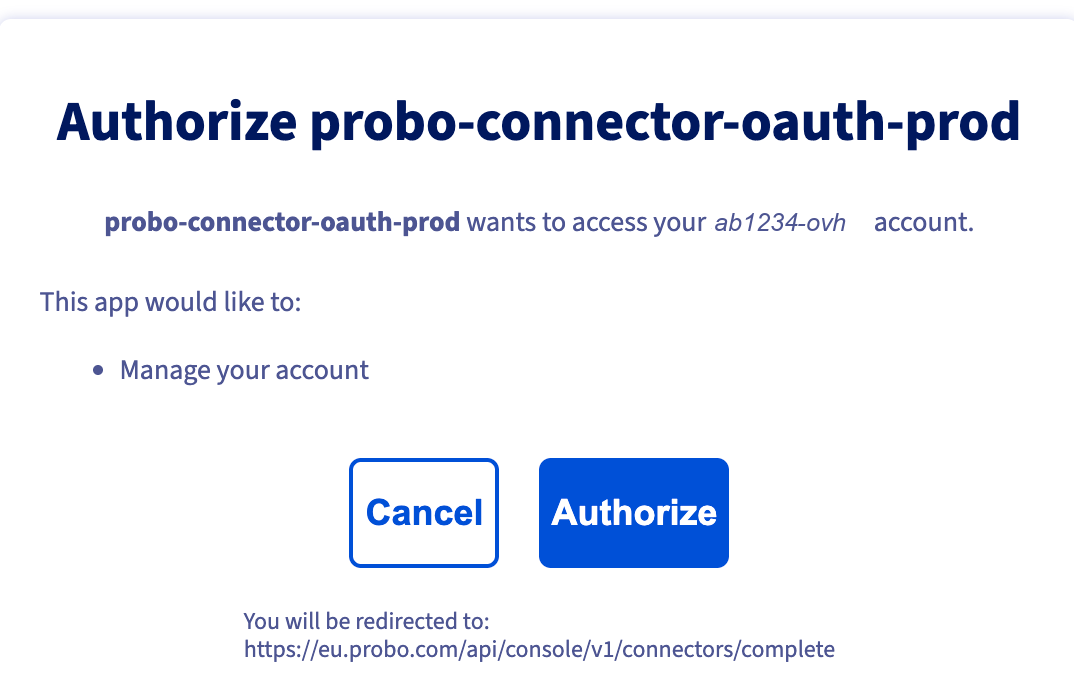
- In Probo, go to Access Review > Connections.
- Find OVHcloud and click OAuth.
- Sign in to OVHcloud if you are not already, then confirm the account shown is the one you want to review.
- Review the authorization screen. It names the client Probo registered and the handle of the account you are about to connect, so confirm both. Probo requests the
account/allscope, which OVHcloud describes as Manage your account. It covers the account and identity routes Probo reads and no other OVHcloud product. Click Authorize.
OVHcloud grants the permissions of whoever authorizes, so authorize as an identity that can read the account’s users and groups. The account holder always can.
Option B: Service Account
Section titled “Option B: Service Account”Choose this option if you want to hold the credential yourself. Deleting the service account revokes Probo’s access. OVHcloud offers no equivalent for an OAuth connection.
- In the OVHcloud Control Panel, go to Identity, Security & Operations > Identities and open the Service account tab.
- Click Add a service account, give it a name (e.g.
Probo Access Review) and a description, then click Create. - Copy the Service account name and the Password. The password is shown only once. These are the client ID and client secret.
- Go to Identity, Security & Operations > Policies and click Create a policy. Use the newer OVHcloud console for this step, reachable from Discover the console in the top bar. The older policy editor can attach a policy to local users only, so the service account you just created will not appear in it.
- Name the policy, then under Identities open the Service accounts tab and select the service account you just created.
- Under Product types, select OVHcloud customer account. Under Resources, select your account.
- Under Actions, select READ, then click Create.
- In Probo, go to Access Review > Connections and find OVHcloud. Client Credentials sits in the menu behind the arrow next to the OAuth button.
- Paste the client ID and client secret, then click Connect. Leave Scope empty. Probo sends the scope this connector needs.
Probo names the source OVHcloud / <your NIC handle> and pulls the identities into your campaigns.
Troubleshooting
Section titled “Troubleshooting”- The connection succeeds but no members appear. The service account has no IAM policy, or its policy has actions but no resource. OVHcloud treats a policy with no resource as granting nothing, so the policy looks complete in the Control Panel while every request is still refused. Open the policy and confirm your account is selected under Resources.
- The service account is missing from the policy editor. The older OVHcloud policy editor lists local users only. Open the newer console from Discover the console in the top bar and create the policy there, where the Identities section has a Service accounts tab.
- Credentials rejected. Confirm you copied the Service account name as the client ID rather than the description, and that you copied the password when the service account was created. OVHcloud does not show it again, so create a new service account if you lost it.
- An API key you do not recognise appears. Classic API credentials are listed under Identity, Security & Operations > API keys. One marked
Created by OVHcloud supportwas issued to OVHcloud’s support team rather than by you, usually while a support ticket was open. Revoke any you no longer need there. - A colleague who uses SSO is missing. OVHcloud does not manage federated identities and no endpoint lists them. Probo reports a federated user only after the audit log records a sign-in. Review the rest in your identity provider.
- The MFA column says a user has no MFA, but they do. The column reports the factor used on the most recent recorded sign-in, because OVHcloud exposes no per-user enrolment state. A user who enrolled after that sign-in still shows the older result.
- A Canada or US account will not connect. OVHcloud issues OAuth2 clients per region and Probo currently registers them in Europe only. A service account does not get you around this: both connect paths use OVHcloud’s European token and API endpoints, so a service account created on a Canada or US account cannot authenticate either.